
3.4 🚀 Updated category sheet and planned transaction sync
-
Explore monthly spending history in category details, with totals that stay in sync with the selected month.
-
Manage accounts more easily with refreshed account lists, details, editing, and bank connection screens.
-
Keep planned payments on track with improved repeat schedules, reminders, skipping, and links to recorded transactions.
3.3 🚀 A few more bug fixes and features
Thanks for sticking around while I clean up these redesign bugs. Enjoy these new fixes and features :)
-
See pending, cleared, and total account balances, and reconcile using the cleared balance.
-
Open and revisit account details more reliably after a navigation crash fix.
-
Find Add Account more easily and review balances in a simpler account layout.
-
See your nearest planned payments first.
-
Start typing as merchant and category search opens, and find clearer repeat frequency wording.
-
Join the Kualia Discord community from Settings.
3.2 🛠️ Minor iOS 27 compatibility fixes
-
Consistent scrolling and page layouts on iOS 27, including after closing a sheet.
-
See overspending indicators even when a category’s funding target is complete or unavailable.
-
Refreshed icons across the Kualia website.
3.1 🤝 Your feedback, heard loud and clear
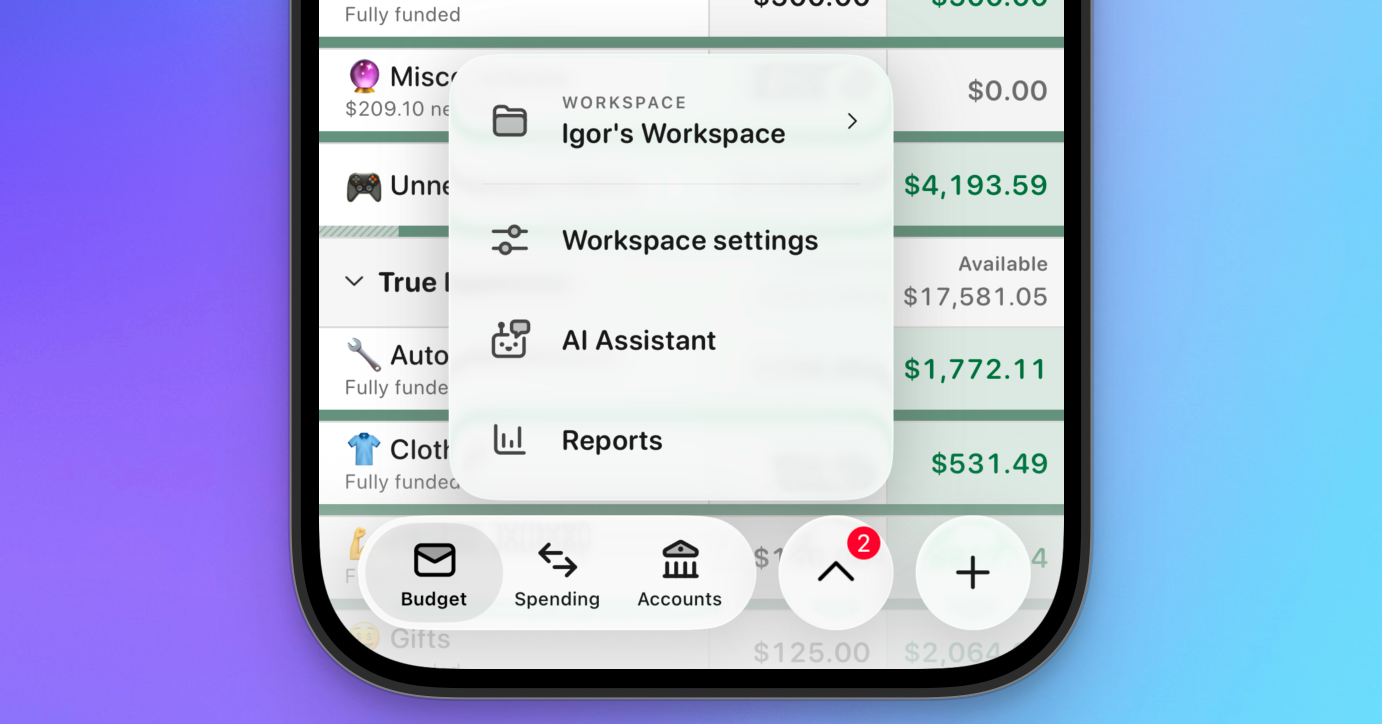
A few of you have emailed me or chatted in the Discord about how, on one hand, the updated design/UI looked cool and was progress, it missed the mark in a few places. Namely:
Marcos, Lewis, Joe, Aldo, Yerkezhan, Tricia, and those that I may have missed, thank you again for the quick and honest feedback. I'm just a guy building an app, and make mistakes. This is in no means the end of the cleanup of your guys' feedback. I'll be pushing updates regularly to get things just right.
That said 👇
-
See budget totals at the bottom of the Budget tab.
-
Progress bars are back for categories.
-
A new compact view you can toggle on in the Budget preferences. Lets you see a lot more categories on a page.
-
Archive and restore categories as your budget changes.
-
Reconcile accounts, reorder accounts and groups, and explore monthly money in and out.
-
You can now duplicate transactions by long-pressing -> Edit.
-
Filter transactions by Inflow and Outflow
-
And, the most annoying one, was the big calendar on the Transactions (now Spending) tab. Now collapsible.
-
And finally, the tabs at the bottom. Got rid of the big AI button. Rarely used. Now you can more quickly access the important pages, with a few in the sub menu.
3.0 🚀 Complete redesign of the iOS app
Hey guys, I spent the last couple weeks redesigning the app. Would love your feedback 🙏 Thanks!
Version 2.38.0: Data exports, safer connections, and more accurate transfers
-
Export your data - Download a portable copy of your Kualia account data from Settings on web.
-
Manage connected AI tools - Review and revoke authorized connections from Account Settings, with clearer consent before granting access.
-
Find the right settings faster - Account settings and workspace settings now have separate, focused navigation.
-
Transfer suggestions produce fewer incorrect matches and provide clearer review and approval flows on iPhone and the web.
-
Account filters on iPhone now update both the balance chart and the account list.
-
Credit and loan balances imported from Apple financial accounts now use consistent liability signs.
-
Categorized credit-card transfers now affect spending totals more accurately.
-
The web app keeps its familiar shell visible while routes and workspace data initialize.
-
Account deletion now removes financial data while preserving the limited records needed for support, billing history, and reactivation.
-
Authorization and identity checks are stronger across bank connections, support tools, connected AI clients, and account recovery flows.
Version 2.36.0: Edit multiple transactions at once on iPhone
Version 2.36.0: Edit multiple transactions at once on iPhone
🎉 What's New- Update several transactions together - Select multiple transactions on iPhone and change their category, account, date, cleared status, or notes in one step.
Version 2.35.0: Clearer transaction details, more accessible iPhone navigation, and more reliable account data
Version 2.35.0: Clearer transaction details, more accessible iPhone navigation, and more reliable account data
🎉 What's New-
See every split at a glance - Split transactions now show each category and amount directly in transaction rows on iPhone and the web.
-
Manage planned transactions faster - Edit, skip, pause, resume, or delete a planned transaction directly from its context menu on the web.
-
Delete and undo actions are now more reliable on iPhone, even when they happen quickly.
-
Category search now finds emoji-prefixed names correctly.
-
Plaid pending transactions now transition to cleared transactions more reliably without creating duplicate updates.
-
Lifetime subscribers keep their access during subscription status refreshes.
-
VoiceOver provides clearer labels, values, and navigation across budgeting, accounts, transactions, reports, and common controls.
Version 2.34.0: Faster iOS launches, transaction shortcuts, synced favorites, and clearer financial history
-
Launch faster and stay productive offline - Kualia now opens immediately from securely cached data on iOS, keeps useful content available offline, and reconnects in the background.
-
Add transactions from anywhere - Start a transaction from the Kualia app icon or Shortcuts and prefill details such as amount, payee, account, category, date, and notes.
-
Keep favorites in sync - Favorite accounts and categories now follow you across web and iOS, with consistent filters and indicators.
-
Review recent budget changes - See recent assignments and money moves from the budget screen on web and iOS.
-
Understand planned transactions at a glance - Open a focused details view with recurrence, due date, linked transaction history, and actions to edit, skip, pause, resume, or delete a plan.
-
Trace workspace changes - Web Settings now includes an activity history showing what changed and where the change came from.
-
Planned transactions now show the correct merchant names and offer automatic-entry controls for future and recurring transactions.
-
iOS lists and currency formatting now render more efficiently.
Version 2.33.0: Launch faster, add transactions with shortcuts, and sync your favorites
Version 2.33.0: Launch faster, add transactions with shortcuts, and sync your favorites
🎉 What's New-
Start instantly, even offline - Kualia now opens with your latest budget data right away and keeps key screens available when your connection drops. Fresh data syncs in the background when you are online.
-
Add transactions from anywhere - Create transactions from the iPhone Home Screen or the Shortcuts app, with optional details such as amount, payee, account, category, date, and notes already filled in.
-
Keep favorites in sync - Favorite bank accounts and categories on iPhone or the web, then use the new favorite filters wherever you manage your money.
-
Control planned transaction entry - Choose automatic or manual entry for future and recurring transactions, and find the setting directly in the transaction editor.
-
Planned transactions now show the correct merchant names.
-
Reports, budgets, accounts, and transaction lists render more smoothly on iPhone.