
Jul 10
budget totals
I would like to be able to quickly see the totals for my budget for categories and groups to compare against my spending. I cannot seem to find a way do do this, if there is a way. Thanks.
Closed
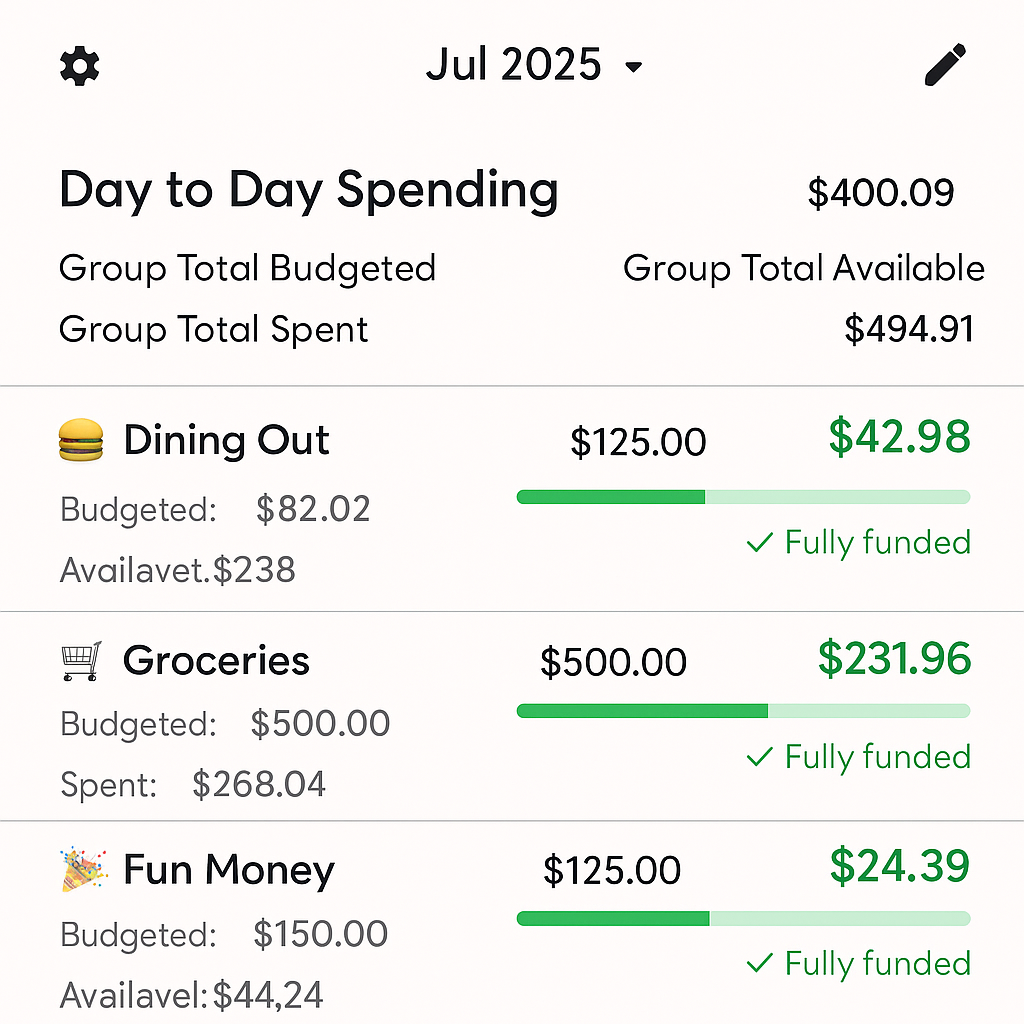
Igor, this is what chatgpt came up with,
Igor, I really wish one of you had seen how mvelopes did period based budgeting. It would look like a modified spreadsheet where on the top row the column headers would be quick assign designation. Your categories would be along the left column. You could set up your quick assigns as your paychecks and then fill in your goals for your categories under the appropriate quick assigns and thus creating a funding profile. All the while, as you change numbers, the spreadsheet adds and subtracts for you so that you stay within each quick assign (or paycheck in my case). Made it very easy to distribute your money in the budget in a big picture way and organize the month efficiently.
Igor, also happy to talk on the phone if you think its a good idea but need better clarity
Casey Elliott can you provide more details about what you mean? What are you trying to compare?
Igor, I would like to compare the amounts that I have budgeted for each category and also each group total and compare it with what I have actually spent. I would like to be able to do this in an easy fashion. We can assign goals for assigning money to each category, but to go back to each category individually to see said goals is tedious. I think it is of value to be able to see if I am staying within my intended budget for each category and group. This would be nice in a format that could allow quick adjustments to the desired goals that need adjusting, like a master spreadsheet for the budget that includes goals, spending and such.
In this screenshot, I can see that I have $42 left for Dining Out, and I've already spent $82. The progress bar shows me that I've spent around 70% of my budget this month. There is no comparison for the group level, which is a good idea, but would be hard to find a spot here without making it too cramped. I'm likely still not understanding. Can you throw this screenshot into ChatGPT and ask it to update it with what you'd like to see?